
dhino Fetch: Governed self-service access to enterprise data
Business teams create complex data segments and visual reports without knowing the database or waiting on IT.
How data flows through dhino
Connect any enterprise data source. Get governed, consistent outputs for business users.
What dhino FETCH gives you
Templates defined by your organization, carrying your logic. Created once by experts, used safely by everyone.
Segment Anything
No artificial limits. Segment on any table, any entity. Combine, subtract, and intersect datasets in multi-step operations.
Consistent Results
The right fields are predefined in templates. Same question, same answer, every time. No conflicting numbers.
Governed Self-Service
Role-based access control, field-level permissions, controlled execution. Safe self-service without raw database exposure.
Visual Reports
Not just lists. Visual reports with charts, trends, and dashboards. Ready for email delivery or API consumption.
Usage scenarios
Multi-step campaign segmentation
Marketing needs a target audience: all contacts matching criteria X, minus everyone contacted this quarter, plus newsletter subscribers, intersected with a regional filter. A multi-step segment that would take hours in Excel.
No manual Excel combining. No waiting for IT. Each step builds on the previous one, governed and repeatable.
Result: Complex campaigns ready in minutes, not days.
Learn moreVisual pipeline reporting
Teams need visual reports from live data: KPI tiles, bar charts, trend lines. Assembled and delivered automatically, no separate BI tool required.
- • Templates define the visual output format
- • Reports delivered via email, Slack, Teams, or PDF
- • Can be surfaced through AI agents on demand
Result: Visual reports that deliver themselves, always fresh.
Learn moreCross-system financial reporting
Finance reconciles data from ERP, CRM, and billing. Each system has different schemas. Someone spends half a day stitching it together every month.
- • Multiple sources, unified through one template
- • Consistent definitions across systems
- • One report, one truth
Result: Month-end close without the spreadsheet chaos.
Learn moreAPI-based external use
Segments and data aren't just for internal reports. Fetch outputs can power external systems too.
- • Segments exposed via API
- • Embedded in websites
- • Served to AI agents
- • Powers dynamic event agendas and landing pages
Result: Fetch defines the segment. Other systems consume it.
Learn moreHow dhino Fetch works
Experts build templates once, capturing the correct logic and access rules. Business users run them with simple parameters, get reliable results in any format, and take action directly from the output.
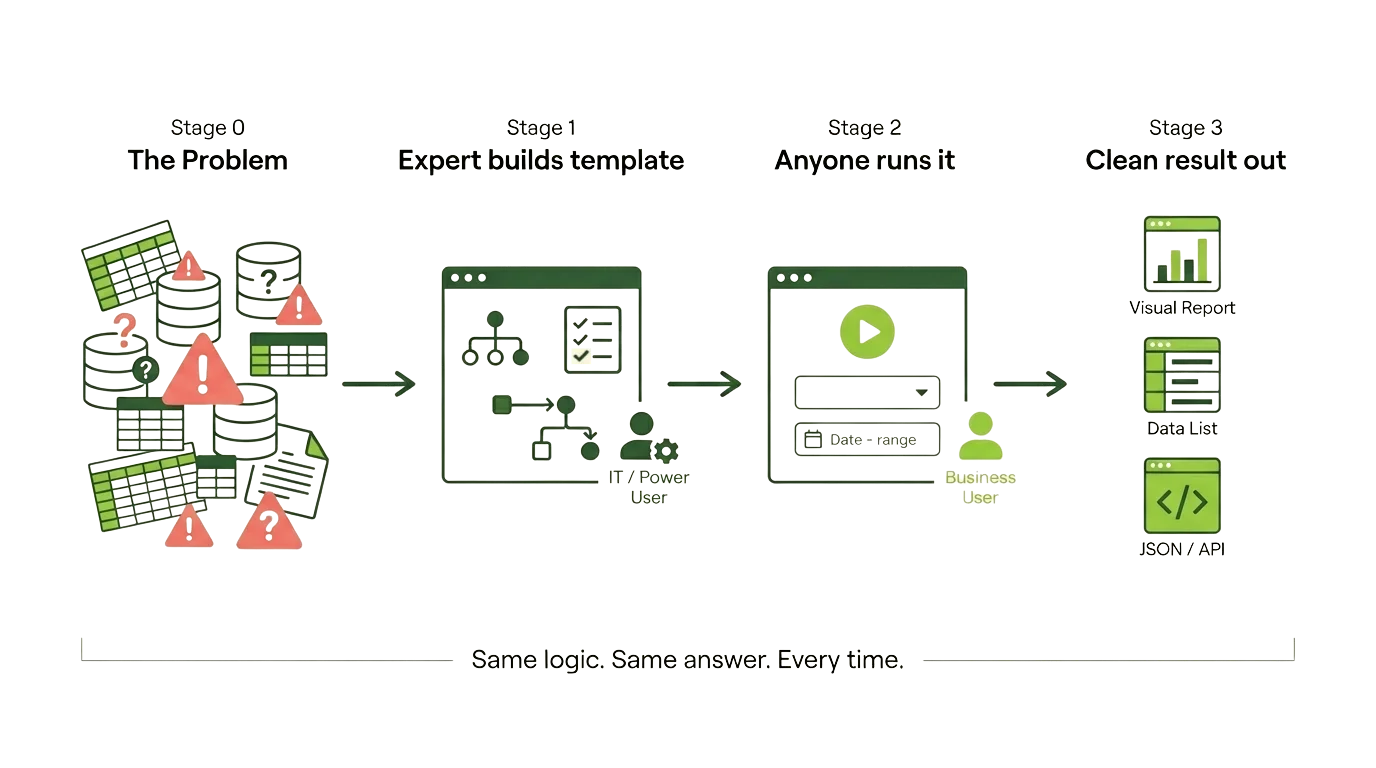
Segmentation actions
Export CSV, tag records, push to marketing tools, save counts for tracking.
Reporting actions
Email reports, post to Slack or Teams, embed in dashboards, export as PDF.
Why standard tools aren't enough
- ✕ Dynamics 365 only segments on Account, Contact, Lead. Nothing else.
- ✕ Power Apps has no real segmentation, just temporary views
- ✕ Excel workarounds everywhere. Manual, error-prone, inconsistent.
- ✕ Logic lives in people's heads, lost when they leave
- ✕ IT becomes a bottleneck for routine data requests
| Standard Tools | dhino FETCH |
|---|---|
| Segment only on Account, Contact, Lead | Segment on any table, any entity |
| Flat list output only | Lists + visual reports |
| Logic lives in someone's head | Logic defined in templates |
| Every request goes through IT | Self-service for business users |
Who benefits from dhino FETCH
Primary users
They want reliable segments, fast turnaround, and independence from IT.
- • Marketing teams
- • Sales teams
- • Operations & Finance
- • Event managers
Enabling users
They create the foundation. Everyone else builds on it. They save significant time by defining logic once, and gain trust in the solution through built-in guardrails.
- • IT teams
- • Data teams & power users
- • Consultants & partners
Frequently asked questions about dhino Fetch
How is dhino Fetch different from Dynamics 365 segmentation?
Can Fetch segment on any table or just Account, Contact, and Lead?
What are dhino templates and how do they work in Fetch?
Does dhino Fetch replace Excel for data reporting?
How does Fetch handle data governance and access control?
Can Fetch generate visual reports or just flat lists?
How does Fetch work with AI agents?
Is dhino Fetch a BI tool or reporting dashboard?
Ready to stop waiting for data?
See how dhino FETCH can give your teams governed self-service data access. Complex segments without complexity.